
In this article
BBB One is generally available. It is our app for BigBlueButton, on Windows, Linux and Android today, and with version 1.2.0 it brings something meetings have been waiting for: artificial intelligence that works for you while your meetings stay where they belong, on your servers and on your own computer.
We believe the tools an organisation meets in should answer to that organisation alone. That conviction has shaped everything we have built around BigBlueButton for more than a decade, and BBB One carries it all the way to the device in your hands. Downloads, requirements and the full list of what the app does are at bbb-one.com.
AI that stays on your computer
A class with students from five countries. A board meeting where half the room reads the chat in a second language. A training session that ends with forty messages nobody has time to reread. AI can help with all of them, but until now it usually meant sending the conversation to an outside service, and many schools, companies and public bodies simply cannot do that.
BBB One takes the other road. The model runs on the computer itself, inside the desktop app, and no meeting text leaves the device. Nothing is sent to us, and nothing is sent to a third party.

Four features are ready today:
- Chat translation. Translate one message, or every message as it arrives, into the language of your app.
- Chat summary. Moderators get the topics, decisions, open questions and action items of the chat in a few lines, prepared in the background while the meeting goes on.
- Live caption translation. Captions are translated as they appear, so everyone can follow the speaker.
- Shared notes. Everyone can read the shared notes in their own language. Moderators can summarize them, or let the AI suggest what the chat decided that the notes don't have yet, and add it after reviewing it.
The AI is off until someone switches it on. It needs a computer with 16 GB of memory and a one-time download of about 6 GB, and no graphics card: the model was designed to run on the processor, as the next section explains.
You stay in control. Each feature has its own switch, before or during a meeting. Describe your sessions in one sentence, such as “Medical training for nurses”, and the AI uses the right words. A small AI mark shows every text the AI made, so nobody mistakes it for a person's words.
Why Olala
The model behind it is Olala, the open model from OVHcloud: made in Europe, open by design, trained on Europe's public supercomputers and built for data that must stay on your own machines.
It is also built for the computers people already have. Olala mini is made of many small experts, and for each word it writes it calls on only the few it needs: about 1 billion of its 7 billion parameters. That is why a modern processor runs it comfortably, and why a graphics card is welcome but not required. AI usually means expensive hardware or a cloud service; here it means the laptop on your desk.
Its weights are published under the Apache 2.0 licence, with its documentation, so anyone can check how it is made. That is why we trust it with your meetings. Its model card is on Hugging Face.
A real app, not a browser tab
Most meeting trouble starts before the meeting: the wrong microphone, a camera another program holds, a tab lost among twenty others. BBB One handles the device details before people join. You choose your microphone, camera and speaker first, share your whole screen or a single window, switch to another program and come back without losing the meeting, and get proper notifications and full screen.
On Android phones and tablets, the same meetings are a tap away, with your microphone, your camera and screen sharing from the phone itself.
Everything classes and meetings need
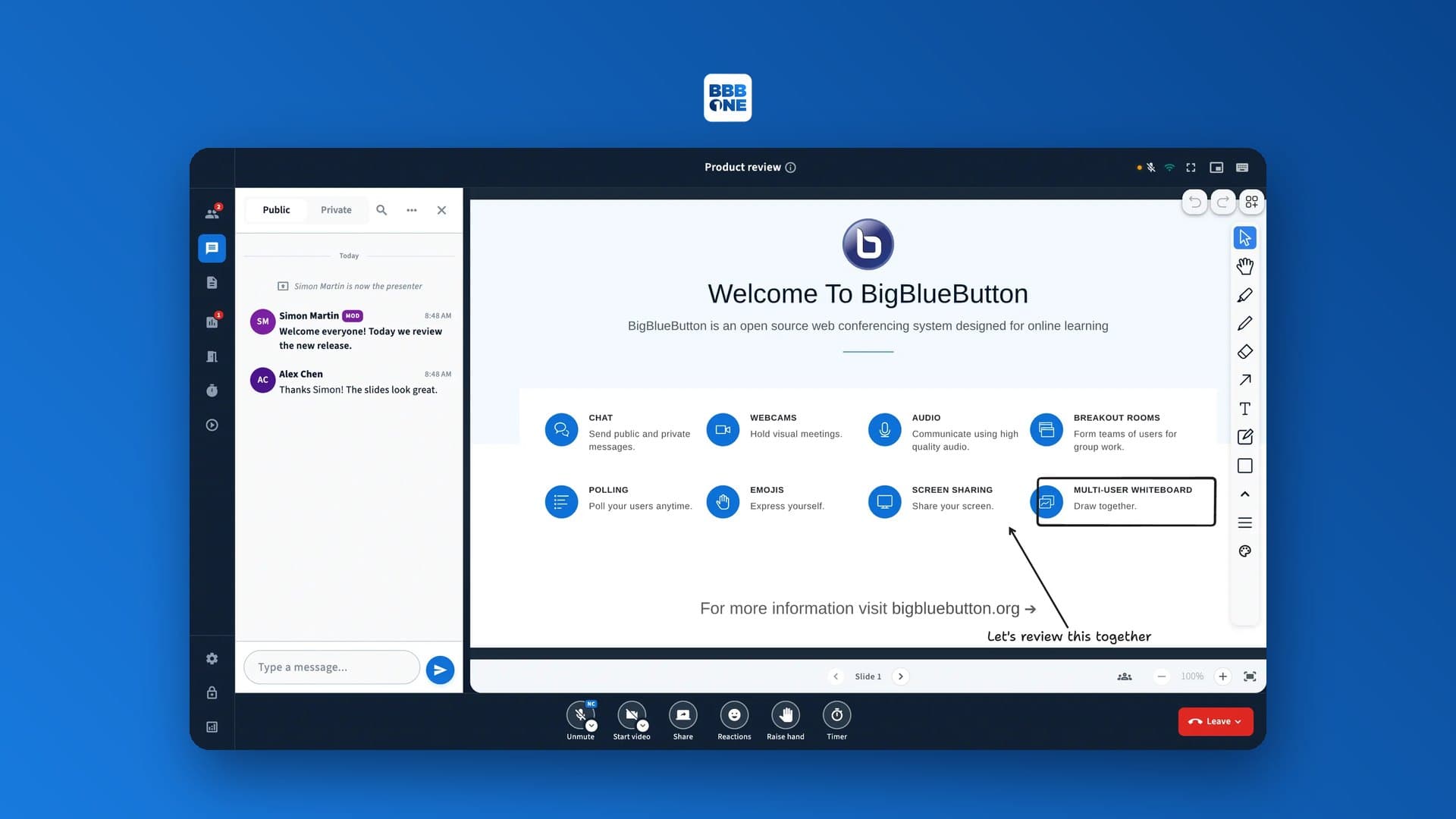
Slides and a shared whiteboard you can write on live, polls, breakout rooms, chat, shared notes, raised hands, reactions, a timer and live captions, with background blur on the desktop. BBB One speaks 53 languages, picks yours automatically, and reads fully right to left in Arabic, not just the text.
Your data stays where it is
BBB One connects to the BigBlueButton servers your organisation already uses. It does not move your meetings, recordings or files anywhere else: recordings are kept by your server, as they always were.
Ready for your IT team
BBB One is on the Microsoft Store and Google Play. On Linux, our package repository serves Debian, Ubuntu, Mint, Fedora and Red Hat family systems, and keeps the app up to date by itself. For larger rollouts we provide signed installers that your IT team can deploy with the tools it already uses, and the app can carry your own name, icon and colours.
Mac, iPhone and iPad are on their way
Our team is working hard to bring BBB One to macOS, iPhone and iPad: the same app and the same meetings, and on the Mac the same private AI. We will announce them here and on bbb-one.com the day they can be installed.
How to get BBB One
BBB One is included with every RIADVICE hosting package for BigBlueButton. If you run BigBlueButton on your own servers, the app is also available with a licence of its own. Every release from now on is described on the What's new page, in plain words.
BBB One is a RIADVICE product: designed, built and supported by our own team, the same team that runs BigBlueButton for our customers every day. It connects to BigBlueButton, the open source platform that a worldwide community has built for teachers and learners since 2007, and to which we are proud to contribute as a BigBlueButton Certified Service Provider.
Book a demo and we will show you BBB One connected to a real BigBlueButton server.