

In this article
BigBlueButton is an open source web conferencing platform. It was created for teaching, and today it also runs meetings, webinars, training sessions and events, but the classroom is where it was shaped and where it is strongest. Teachers and students join from a web browser, with nothing to install, and find the tools a lesson needs in one place: slides and a shared whiteboard, polls, breakout rooms, shared notes, chat, recordings and a dashboard that shows who took part.
If you already teach with Zoom, Microsoft Teams or Google Meet, most of it will feel familiar within minutes. What is new is everything around the classroom: who runs it, where your data lives, how it plugs into your learning platform and what it costs. This guide follows the classroom experience, so you can decide whether BigBlueButton fits your school, university or training centre, and what a rollout involves.
BigBlueButton in one minute
- Open source. The code is published under the GNU Lesser General Public License, version 3. There is no licence fee per teacher or per room; you pay for the servers it runs on, or for a provider who runs it for you.
- Born in a university. BigBlueButton was first developed by students and faculty of the Technology Innovation Management program at Carleton University in Ottawa, and the project started in 2007. Its name comes from the goal of making a virtual classroom as easy to set up as pressing a big blue button.
- Beyond the classroom. The same rooms serve staff meetings, webinars, professional training and conferences, with the teaching tools still at hand.
- Inside the learning platform. BigBlueButton has shipped in Moodle itself since Moodle 4.0 in April 2022, and it connects to other platforms through the LTI standard and its API.
- In the browser. It runs in current desktop browsers, in Chrome on Android and Safari on iOS.
- Current version: 4.0.2. BigBlueButton 4.0 was released on 14 October 2026, and its latest update, 4.0.2, on 6 November 2026.
- Your choice of server. You can install it on your own server or have a provider host it, in the country you choose.
What maps to what if you know other video conferencing tools
The vocabulary is the first thing to learn, and there is not much of it.
| The usual term | In BigBlueButton |
|---|---|
| Host or organizer | Moderator: manages the room, the participants and the recording |
| Attendee or participant | Viewer |
| The person sharing | Presenter: one person at a time controls the slides and the whiteboard |
| Screen sharing | Screen sharing, by the presenter |
| Shared slides | Presentation: upload a PDF, Word, Excel or PowerPoint file and teach on it |
| Whiteboard | A multi-user whiteboard on top of every slide |
| Breakout rooms | Breakout rooms, which the moderator can visit |
| Polls | Polls, with results the presenter can show to the class |
| Meeting chat | Public and private chat, with messages the moderator can pin |
| Meeting notes | Shared notes that everyone can edit during the session |
| Attendance report | The Learning Dashboard, with activity per student, downloadable as a CSV file |
| Recording | Recording, kept on the BigBlueButton server and played back in the browser |
| Live captions | Live captions, when the administrator turns them on |
Two habits are different. First, a BigBlueButton room starts empty every time. The server keeps nothing between sessions, no chat and no slides, by design: it keeps the system simple and private. Slides you want in every class are attached to the room in your learning platform and loaded when the session starts.
Second, students do not need an account. They join from a link in the course, usually by clicking the session in Moodle, and arrive in the room under their own name.
How a class runs in BigBlueButton
BigBlueButton was designed around a lesson, and it shows in the details.
The presentation is the centre of the room. The presenter uploads slides, writes on them with the whiteboard tools and can hand the whiteboard to the whole class, so students solve the exercise on the same page. Since version 4.0, a viewer can request to present and a moderator approves with one click, which suits student presentations.
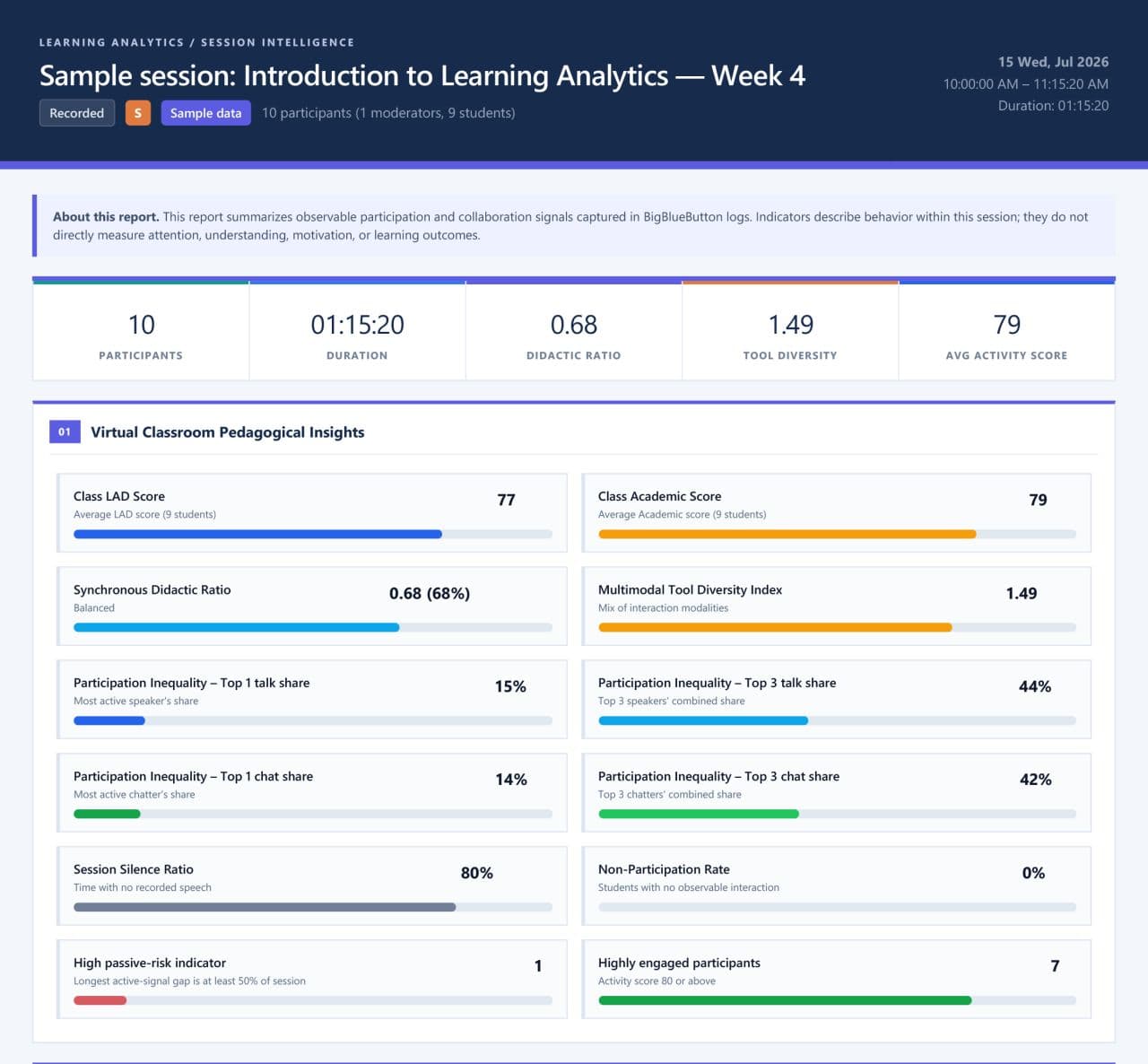
Participation is visible. Students raise their hand, react, answer polls and write in the shared notes. The Learning Dashboard collects all of it per student: online time, talk time, webcam time, messages, reactions, raised hands, poll answers and whiteboard annotations, with an activity score and a timeline. A moderator can download it as a CSV file. Since 4.0 every breakout room has its own dashboard.

Classroom manners are built in. Moderators can lock what viewers are allowed to do, manage a waiting room for guests and mute the class. Since 4.0 they can also ask a student's consent before unmuting them instead of switching their microphone on directly.
It reaches students wherever they are. Everything runs in the browser, and the 4.0 client was reworked for phones, with cameras arranged in pages you swipe through. Students can also follow with audio only, which matters on a weak connection.
What is new in BigBlueButton 4.0
BigBlueButton 4.0 is the biggest change to the classroom in years.
- A redesigned interface. A new navigation sidebar holds the user list, chat, shared notes and timer, and an Apps Gallery gathers polls, breakout rooms, the timer and captions, with your favourites pinned.
- A new media engine. Audio, cameras and screen sharing now run on LiveKit, an open source real-time media server.
- Better on phones. The mobile layout was rebuilt: paged cameras, a compact toolbar and a side-by-side view in landscape.
- Better sound. A dedicated audio tab lets each person choose standard noise filtering, a stronger background-noise filter that the administrator can enable, or the original sound, which is the right choice for music and singing lessons.
- Small things teachers asked for. Pinned chat messages, a searchable user list, a redesigned timer with presets, and a light or dark theme that follows the device.
- A modern base. Version 4.0 runs on Ubuntu 24.04.
Where BigBlueButton fits
Most people never open BigBlueButton directly. They reach it from the platform where their course already lives.
- Moodle. BigBlueButton is part of Moodle itself: a teacher adds a BigBlueButton activity to a course, and Moodle handles who is a moderator, who is a viewer and where the recordings appear. Moodle 5.0 added grading of BigBlueButton sessions in the gradebook, and Moodle 5.3 turns the activity on by default for new sites. Our article on what research says about Moodle and BigBlueButton explains why the pair works so well for teaching.
- Other learning platforms. BigBlueButton accepts LTI launches, the standard way learning platforms connect to external tools, so platforms such as Open edX, D2L Brightspace and Blackboard can open a BigBlueButton room without custom code.
- Your own platform. A school, a training company or a business often runs its own learning platform, built in-house or bought from a vendor. BigBlueButton connects to it through its API, which creates rooms, lets people in with the right role and returns the recordings and the activity data. RIADVICE builds these custom integrations, such as the one between BigBlueButton and the Digiforma training management platform.

Running BigBlueButton: your own server or a provider
BigBlueButton is software, not a subscription, and you decide where it runs.
On your own server. BigBlueButton installs on a dedicated Ubuntu 24.04 server; the project publishes its minimum requirements for production. How large the servers must be depends on how many people join at the same time and how many of them share a camera, and that sizing is where experience counts most.
With a hosting provider. A provider runs the servers, the upgrades, the monitoring and the storage, and connects BigBlueButton to your learning platform. You still choose the country your data stays in.
Planning a move to BigBlueButton
A rollout goes well when it is planned around the timetable, not the software. These are the questions to settle first.
- Where will it run? Your own servers, a provider, or both, and in which country.
- How many people at the busiest hour? Count the students in class at the same time at peak, not the total enrolment, and how many of them will share a camera. That number sizes the servers.
- How will it connect? Moodle has it built in; other platforms use LTI or the API. Decide who becomes a moderator and who a viewer.
- What happens to recordings? Decide where they are stored, for how long, and who can watch them.
- What do you need to measure? If attendance and participation matter, plan to keep the Learning Dashboard data: by default the server deletes it two minutes after a session ends, so it must be downloaded or collected automatically.
- Test with a real class. The project itself strongly recommends testing a server with real users before relying on it. A pilot with a few teachers for a few weeks shows more than any specification.
- Train the moderators. Half an hour on the vocabulary above, the presentation and the breakout rooms is usually enough for teachers who already teach online.
Frequently asked questions
Is BigBlueButton free?
The software is free and open source. Running it is not: you pay for the servers and the people who maintain them, or for a provider who does both. There is no fee per teacher, per room or per student.
Is BigBlueButton only for schools?
No. It was created for teaching and the classroom shaped it, but the same rooms run meetings, webinars, professional training and events.
Does BigBlueButton work on phones and tablets?
Yes. It runs in Chrome on Android and in Safari on iPhone and iPad, with nothing to install. Screen sharing is not available from Android browsers.
Do students need an account?
No. Students join from a link, usually from their course in Moodle or another learning platform, and the platform tells BigBlueButton their name and role.
Can I record a class?
Yes, when recording is enabled for the room, usually in the activity settings of the learning platform. The recording keeps the slides, whiteboard, chat, cameras and screen sharing, and plays back in the browser.
How do I see who attended?
The Learning Dashboard shows each student's online time, talk time, messages, poll answers and more, and downloads as a CSV file. For reports across all your sessions, BigBlueButton Analytics keeps every class and turns it into learning analytics.
Who develops BigBlueButton?
Its open source community. Developers and organisations around the world build and maintain BigBlueButton together, with one goal: making online teaching work for every teacher and every student. The work happens in the open on GitHub, where anyone can read the code, report an issue or contribute, and a core team of committers looks after the quality of every release.
Getting started with BigBlueButton
The quickest way to judge BigBlueButton is to teach one real class with it. If you want to try it without setting up a server, connect it to your learning platform, or plan a rollout for a whole institution, RIADVICE can help: we are a BigBlueButton Certified Service Provider, and we provide BigBlueButton hosting connected to your learning platform, consulting and expert support, and custom integrations with your own platform.
Talk to our team about your classes, and we will tell you plainly what a rollout involves.